If you are logged into CharacterStrong as a District Lead, your experience will look different from what School Leads and Educators see.
At the district level, you can access district-wide content and resources, but you will not see the Teach button or the Classes tab. That is because classes must be connected to a specific school, not to the district itself.
If you want to create classes or deliver lessons, you will need to switch from your district view into one of the schools you are associated with.
Why Your District Lead View Looks Different
When you are logged into the curriculum site as a District Lead:
- The top dropdown menu will display your district name
- In the left-hand navigation, under Tier 1, you can select Explore
- Your view may look different from the experience shown for School Leads or Educators
Why District Leads Do Not Have the Teach Button or Classes Tab
Classes in CharacterStrong are tied to school organizations, not to the district as a whole.
Because of that:
- You cannot create or manage classes directly under a district account
- You must be inside a specific school in order to teach lessons or create classes
How to Access the Teach Experience and Classes as a District Lead
If you are associated with one or more schools, you can switch into a school-level view to access teaching features.
Step-by-step
- Log in to the CharacterStrong curriculum site.
- At the top of the page, locate the dropdown menu next to the CharacterStrong logo.
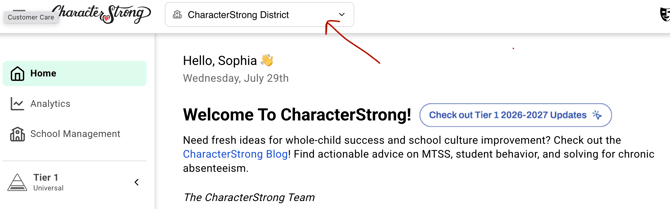
- Open the dropdown.
- Select one of the schools you are associated with.
- Once switched to that school, you will see Teach and Explore.
- You can then create classes and deliver lessons for that school.
Please note: When you click into a school your permissions may change depending on your role at that school. If you wish to go back to your District Lead account you can simply re-open the dropdown menu and select the district organization.
Need Help?
If you need any additional account support:
- Email our Support Team at support@characterstrong.com
- Connect with your Customer Success Manager for personalized guidance
Don't know who your Custom Success Manager is? Reach out to support@characterstrong.com