
How to Access Tier 2 Pre- and Post-Test Assessments
- Navigate to the Delivery Dashboard.
- Select your student from either:
- My Supports, or
-
- School Supports.
- Open the student’s profile.
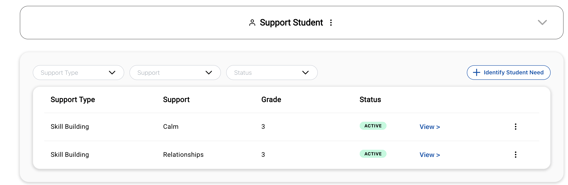
- Locate the skill-building group (Tier 2 support) where the assessment should be completed.
- Click View on the appropriate support type.
Completing the Pre- or Post-Test Using Progress Monitoring
- Once inside the support type, locate the Progress Monitor column.
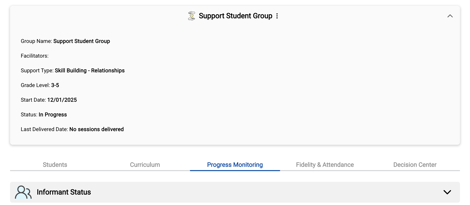
- Select Progress Monitor and "Input Data"
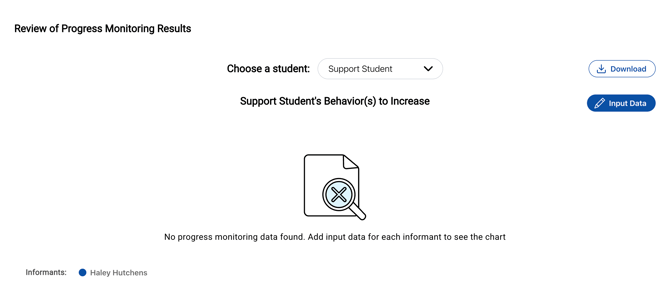
- Choose the appropriate informant (the person providing information about the student).
- Complete the six survey questions.
- These six questions can serve as the Tier 2 pre- and post-test assessment.
- Submit the responses to save the data.
Printing the Survey (Optional)
- The survey questions can be printed if you would like to:
- Provide a paper copy to the informant, or
-
- Collect responses offline before entering them into the system.
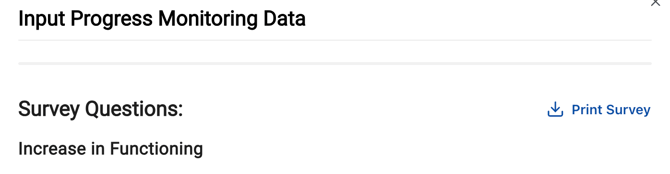
- Collect responses offline before entering them into the system.
Need Help?
If you need any additional account support:
- Email our Support Team at support@characterstrong.com
- Connect with your Customer Success Manager for personalized guidance
Need additional support? Please reach out to us at support@characterstrong.com!