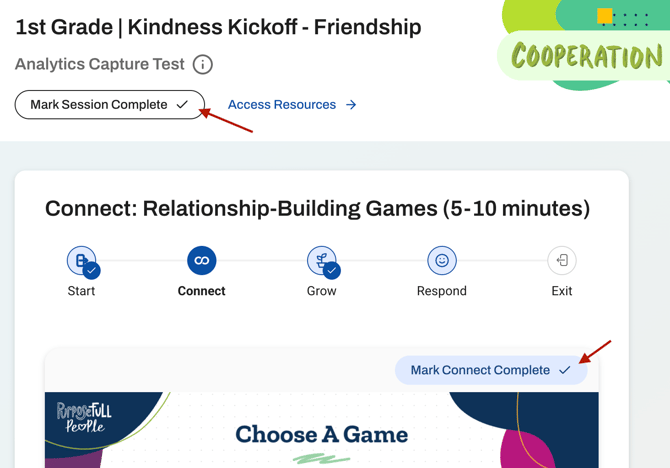
When you are in the Teach section of the curriculum lessons, there will be mutliple ways you can track your progress. For each of the 5 lessons parts you will have an option to mark each of these parts as complete. This is shown in the screenshot below where you can click "Mark Connect Complete". The tracking of each lesson part is for INDIVIDUAL tracking only - marking part of a lesson complete is not reflected in your analytics.
To fully mark a session as delivered, you will need to click the "Mark Session Complete" button located on the top left of your screen directly above the lesson slides. Clicking this button marks the full session as complete and this progress will be visible by your School and District Leads!
Need Help?
If you need any additional account support:
- Email our Support Team at support@characterstrong.com
- Connect with your Customer Success Manager for personalized guidance
Don't know who your Custom Success Manager is? Reach out to support@characterstrong.com