
Types of District Roles
-
District Lead:
- Full access to all analytics and school management settings for every school in the district.
- Suitable for users who need oversight of district-wide data and operations.
-
District Educator (with Tier 2 Permissions):
- Access to students in all schools you support at Tier 2.
- Ideal for educators who provide direct support to Tier 2 students across multiple schools.
How to Toggle Between Schools
When you are set up at the district level with Tier 2 permissions:
- You will see a list of the schools (such as “Kindness Elementary” or “Purposeful People Elementary”) that you are able to support.
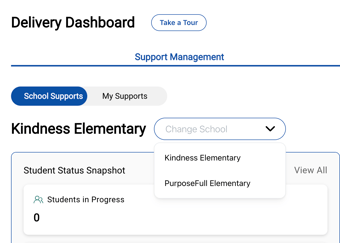
- Within your support management and student dashboard, there will be an option to toggle or switch between the different schools.
- This allows you to seamlessly view and manage the students in each building as needed.
If you need Tier 2 permissions, please contact your District or School Lead and share the article below with them.