Overview: This article walks you through how to locate Supplemental Resources and Lessons within the CharacterStrong Curriculum site, including Policy Programming and Future Ready (for secondary) materials.
🔍 Step-by-Step Instructions
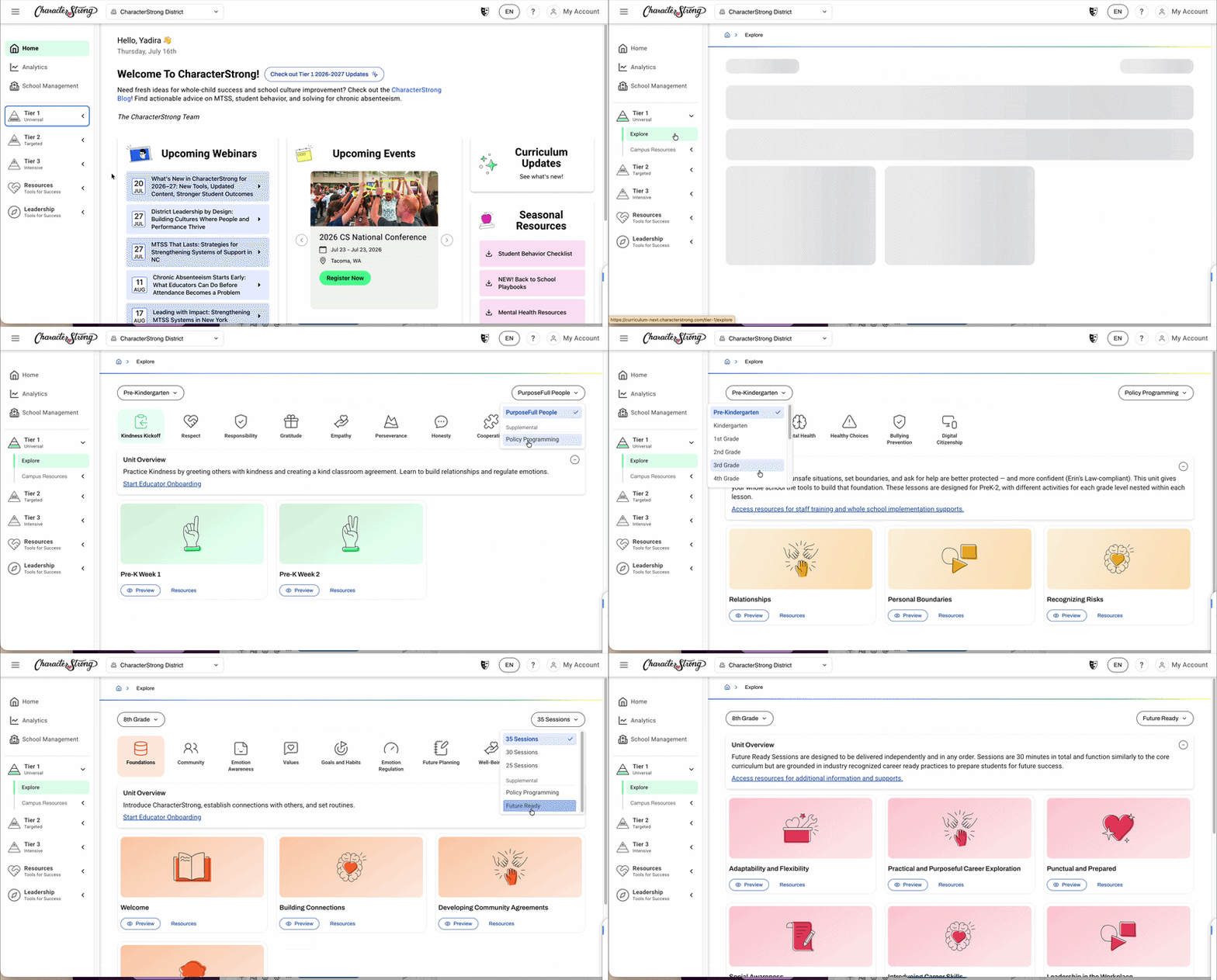
1: Navigate to Tier 1: Open the left-hand sidebar and select Tier 1 to expand the menu.
2: Go to Teach & Explore: Once Tier 1 is open, you'll see Teach & Explore option on the left-hand side. You can access Supplemental Resources through this section.
3: Select Your Class: Use the drop-down menu to select the class you'll be delivering sessions for.
Step 4: Locate the Supplemental Resources: On the right-hand side drop-down menu you'll see:
- 📘 PurposeFull People at the top for Elementary
- Scope and sequence selected for Secondary
- 📎 Supplemental Resources directly underneath in the dropdown, which includes:
- Policy Programming
- Future Ready (for Secondary)
💡 Note: Supplemental Resources and Lessons will appear just beneath the number of sessions for your pre-selected Scope and Sequence.
Need Help? If you need any additional account support:
- Email our Support Team at support@characterstrong.com
- Connect with your Customer Success Manager for personalized guidance
💬 Don't know who your Customer Success Manager is? Reach out to support@characterstrong.com