- Navigate to Tier 2 (Delivery Dashboard) or Tier 3 (Student Dashboard) on the left-hand side
- Open up a student's dashboard
- The default view shows the current school year.
- To see prior-year supports...
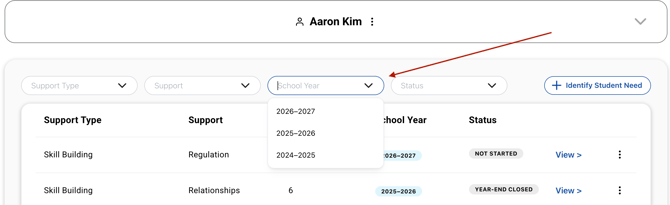
- Locate the school year selector at the top of the student's dashboard.
-
- Select the prior school year (e.g., 2025–2026).
- Prior-year supports will display with a "Year-End Closed" status.
Prior year supports that are in the "year-end closed" status will only be available in read-only format
Note: The global students table lists all students across all time. It does not currently support school year filtering — this is a known limitation that will be addressed in a future update.
Need Help?
If you need any additional account support:
- Email our Support Team at support@characterstrong.com
- Connect with your Customer Success Manager for personalized guidance
Don't know who your Custom Success Manager is? Reach out to support@characterstrong.com