
Add a Co-Teacher While Creating a Class
- Log into the curriculum site: curriculum.characterstrong.com/login
- In the left-hand navigation menu, go to Tier 1
- Expand the Tier 1 section
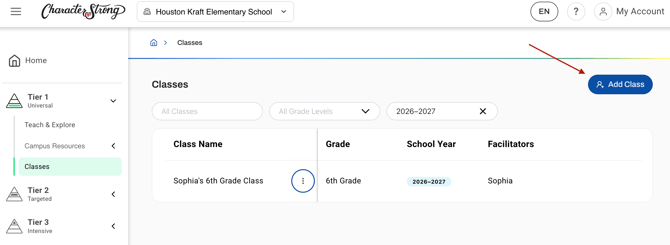
- Click the Classes tab
- Choose to view your current classes, or click Add Class if you are creating a new one.
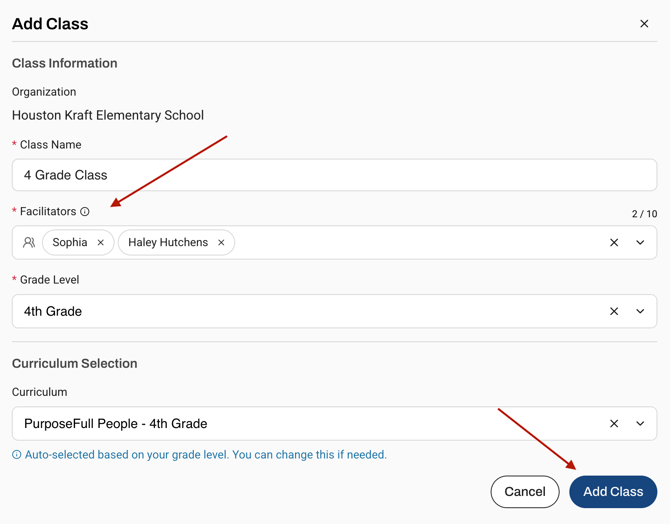
- In the class setup form, locate the Facilitators field near the top right
**Confirm you are listed as a facilitator as well! - Search for the user you want to add as a co-facilitator
- Select their name to add them to the class
- Complete the remaining class details, including:
- Class Name
- Grade Level
- Curriculum
- Click Add Class to save your changes
Edit Co-Teachers on an Existing Class
You can update facilitators on a class at any time.
- Go to Tier 1 in the left-hand menu
- Click the Classes tab
- Find the class you want to update
- Click the three dots next to the class
- Select Edit Class.
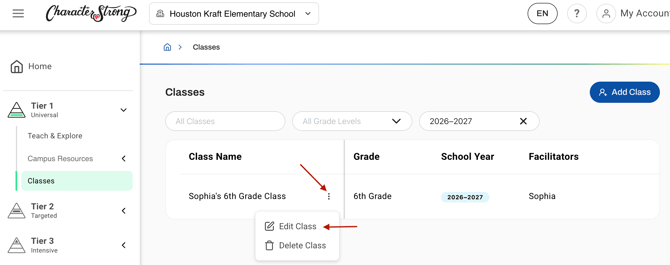
- In the Facilitators field, add or remove facilitators as needed
- Save your changes
Important Notes: Once a facilitator is added to a class, they will also be able to edit that class. Deleting a class with remove the class for ALL facilitators.
Need Help?
If you need any additional account support:
- Email our Support Team at support@characterstrong.com
- Connect with your Customer Success Manager for personalized guidance
Don't know who your Custom Success Manager is? Reach out to support@characterstrong.com