Adding a New Student
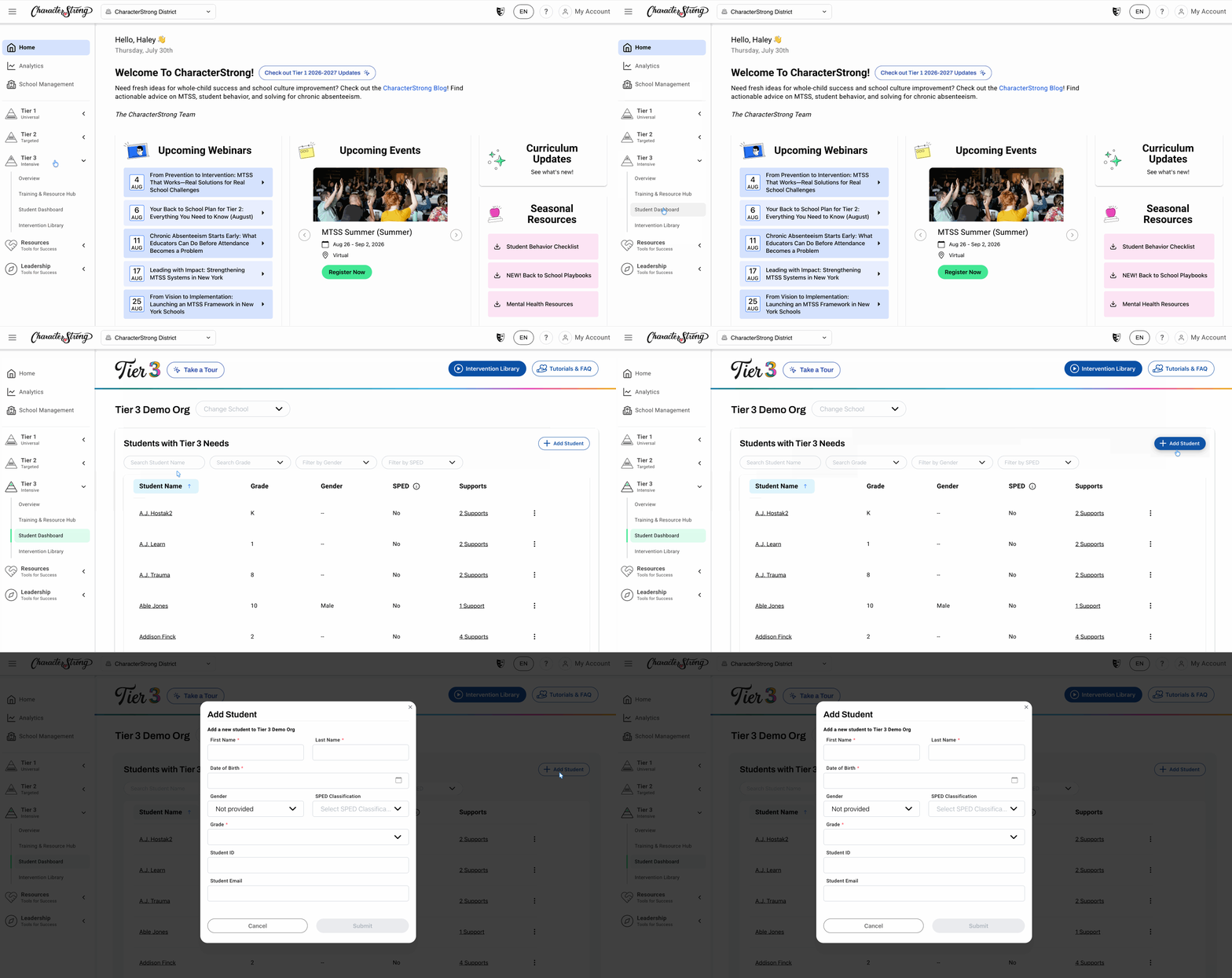
- Go to your Tier 3 student dashboard. This is where all of your students are uploaded.
- If the student you need isn't already listed, click + Add Student.
- In the menu that appears, fill in the following required fields:
- First name
- Last name
- Date of birth
- Grade level
- Save to add the student to your dashboard.
Identifying a Student Need
Once a student has been added, you can identify their support needs:
- Go to Supports for that student.
- Click + Identify Student Need.
- This opens the Define, Analyze, and Select step process, where you'll determine the correct support pathway for the student's Tier 3 process.
After you've identified the student need, a support will appear under that student's Supports in the dashboard. From here, you can monitor the student's progress and work through the curriculum with them.
.gif?width=670&height=354&name=Tier%203%20(4).gif)
Need Help?
If you need any additional account support:
- Email our Support Team at support@characterstrong.com
- Connect with your Customer Success Manager for personalized guidance
Don't know who your Custom Success Manager is? Reach out to support@characterstrong.com