When you create class, you get to choose the grade level as well as the number of lessons from the scope and sequence (see screenshot)
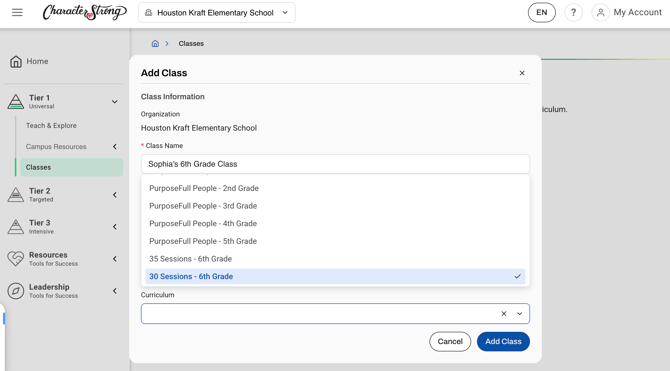
Please note: PurposeFull People (Elementary) Curriculum only has one lesson scope and sequence with the option to add Kindness Kickoff (2 weeks) and Kindness Closure (2 weeks).
Middle School has 3 options (35 sessions, 30 sessions, 25 sessions)
High School has 3 options (25 sessions, 20 sessions, 15 sessions)
Once a class has been created you have the ability to edit the curriculum you have selected.
How to edit the curriculum you have selected for a Tier 1 class:
-
Open the "Tier 1" toggle on the left-hand side
-
Click the "Classes" tab
- Find the class you wish to edit
- Click the three dots next to the class name and click "edit class"
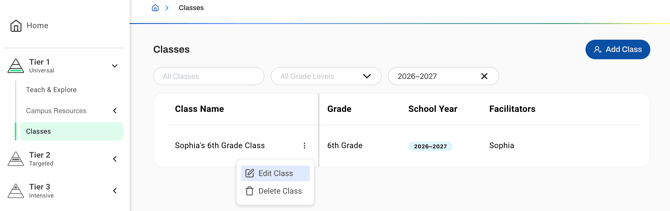
- Choose the new curriculum and click save!
Important: Changing curriculum will delete your current curriculum and all associated session data. If you have a co-facilitator assigned to this class these changes will be reflected on their end as well
Need Help?
If you need any additional account support:
- Email our Support Team at support@characterstrong.com
- Connect with your Customer Success Manager for personalized guidance
Don't know who your Custom Success Manager is? Reach out to support@characterstrong.com